
VokabelWunder • A hidden gem for an excellent free vocabulary trainer
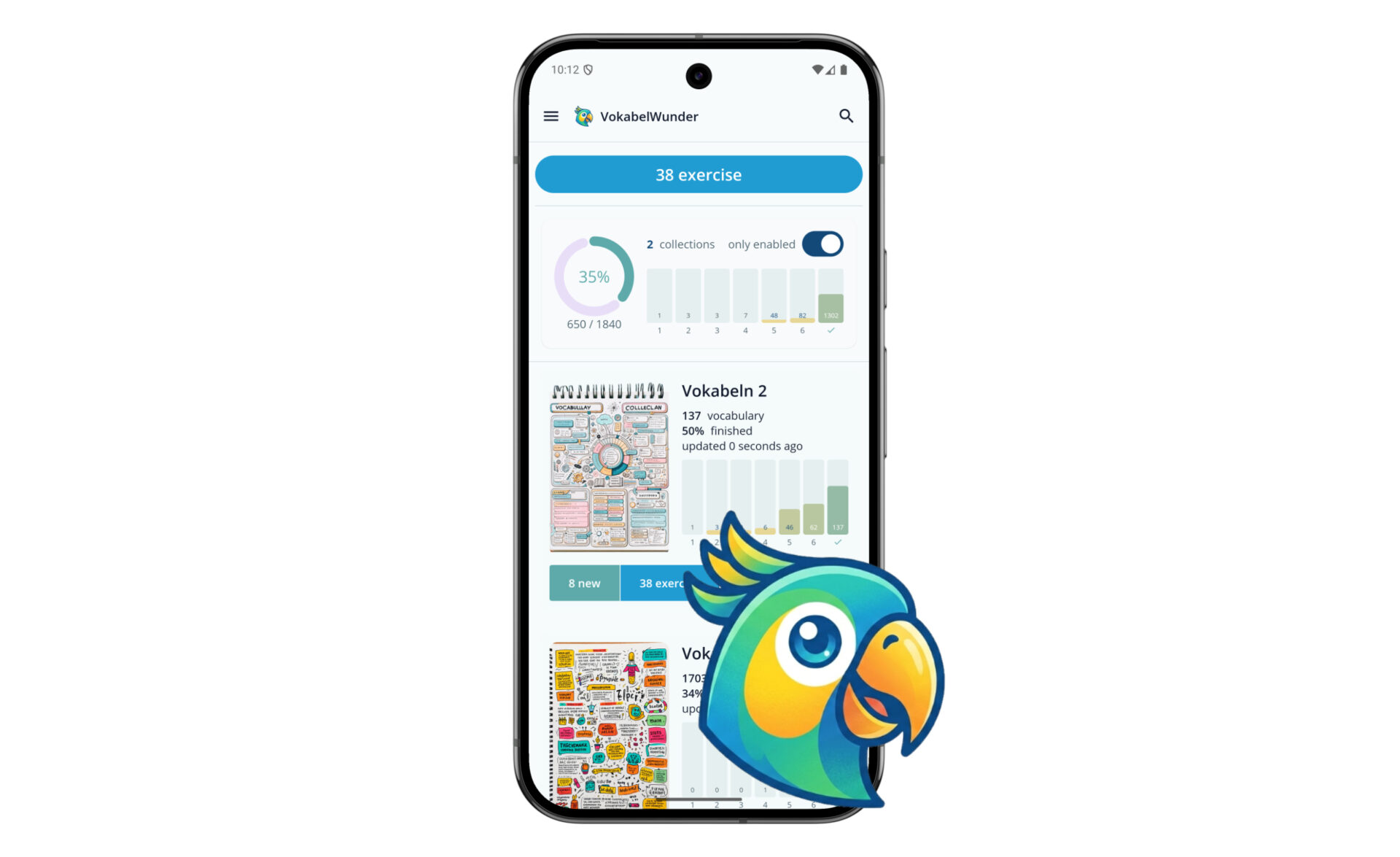
For years I’ve been reading English books and constantly stumbling across new words. I’ve tried many vocabulary trainers, but none of them really matched my reading habits. So I developed my own: VokabelWunder. I’d like to introduce it to you today. VokabelWunder combines the best and most useful features in one app. Of course with Artificial Intelligence, because these days nothing works without AI. And all of this free of charge and available to everyone.
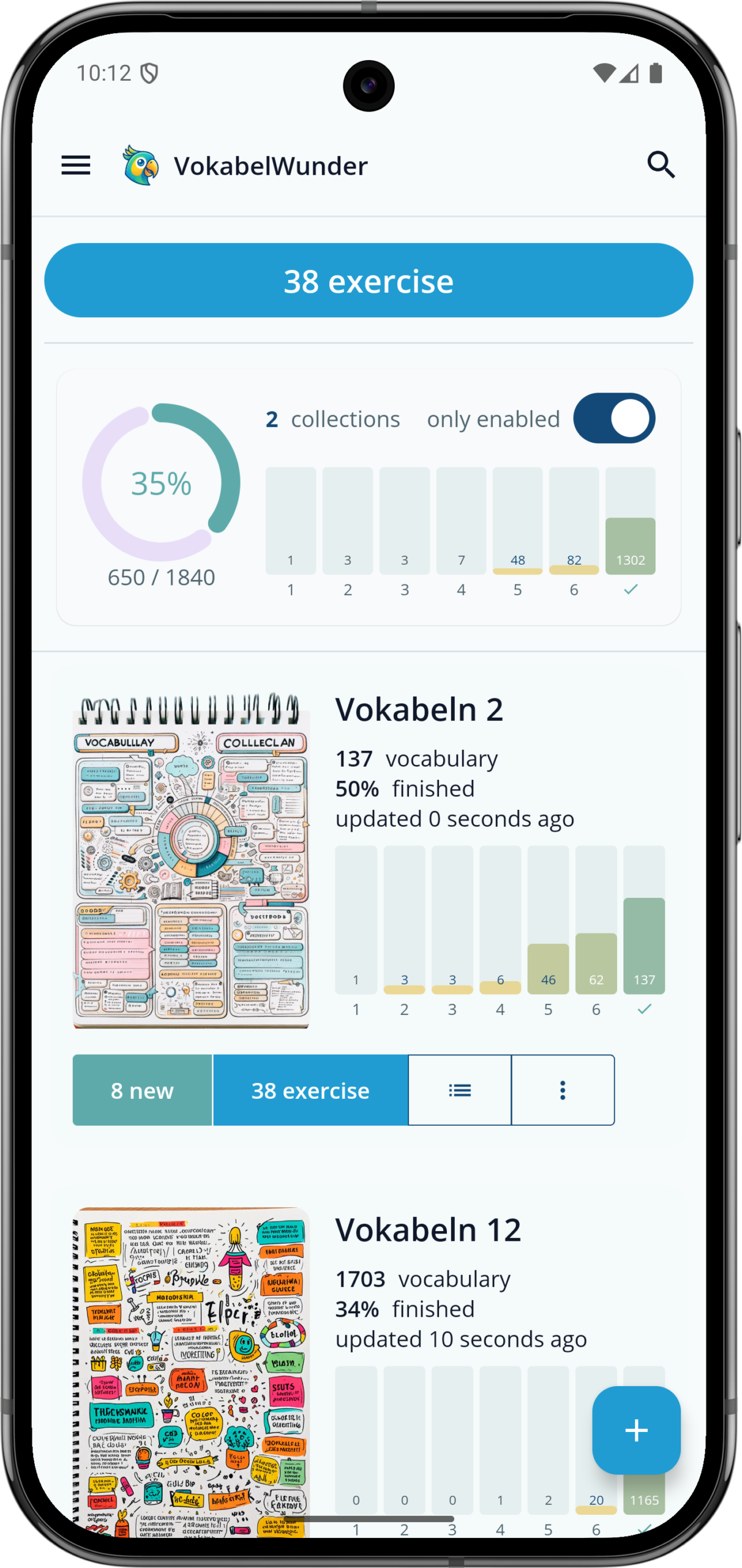
There are countless vocabulary trainers out there, but those who read books have a few additional requirements. On top of that, I found many of the established vocabulary trainers too impractical and in some cases far too buggy. I picked out the most useful features and also wanted a phase system to learn as efficiently and time-consciously as possible. In my trainer, I’ve created a vocabulary collection for each book. While reading, I can simply look up unknown words in a dictionary and add them to my vocabulary collection with a single click. But beyond these basic features, I’ve built in numerous other functions as well. The trainer is also excellent for school children.
The vocabulary trainer is available as an Android App and as a web application. The web application is very convenient when you’re at your laptop and need to enter multiple vocabulary items or type them from a textbook. You can of course also practice with it, and the web application works on smartphones too. The Android app is ideal for daily review, or when you’re reading a book and want to look up words and add them to your learning list with a single click.

Phases
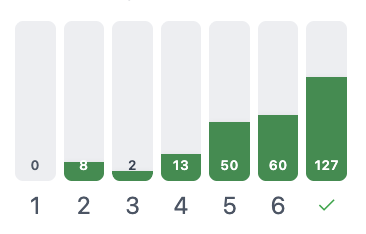
A phase system is one of the most important features for me. I don’t want to review all my vocabulary every single time. Words you know well should be tested less frequently, while words you haven’t memorised yet should be repeated more often. The app tracks this for each individual word. This is also known as the Leitner system or spaced repetition. It follows the principle of flashcards that you move into the next higher box for less frequent review.
The principle is simple: if you know a word, it moves to the next phase. If you don’t, it gets downgraded and will be tested more frequently again. When a word is new, it is tested after one day. If you knew it the next day, it moves to phase 2 and is tested again after three days. Then after 7, 16, 35, and finally after 75 days. If you knew the word in phase 6 (i.e. after a 75-day wait), it is considered completed and learned. The app visualises this for each vocabulary collection, so you can see your progress at a glance.
The advantage of this approach is that you don’t have to review all your vocabulary every time. Once a word is in circulation, it is managed through the phases and not presented during every practice session. This system works in both directions — from your native language into the foreign language and back.
Text-to-Speech
When learning, it helps enormously to engage as many senses as possible and to always hear the word you’re trying to learn. It also helps when you’re unsure about pronunciation. That’s why I’ve built in a text-to-speech feature that reads each word aloud. I find it very pleasant. With a button, you can have the word read out to you as many times as you like.
Images
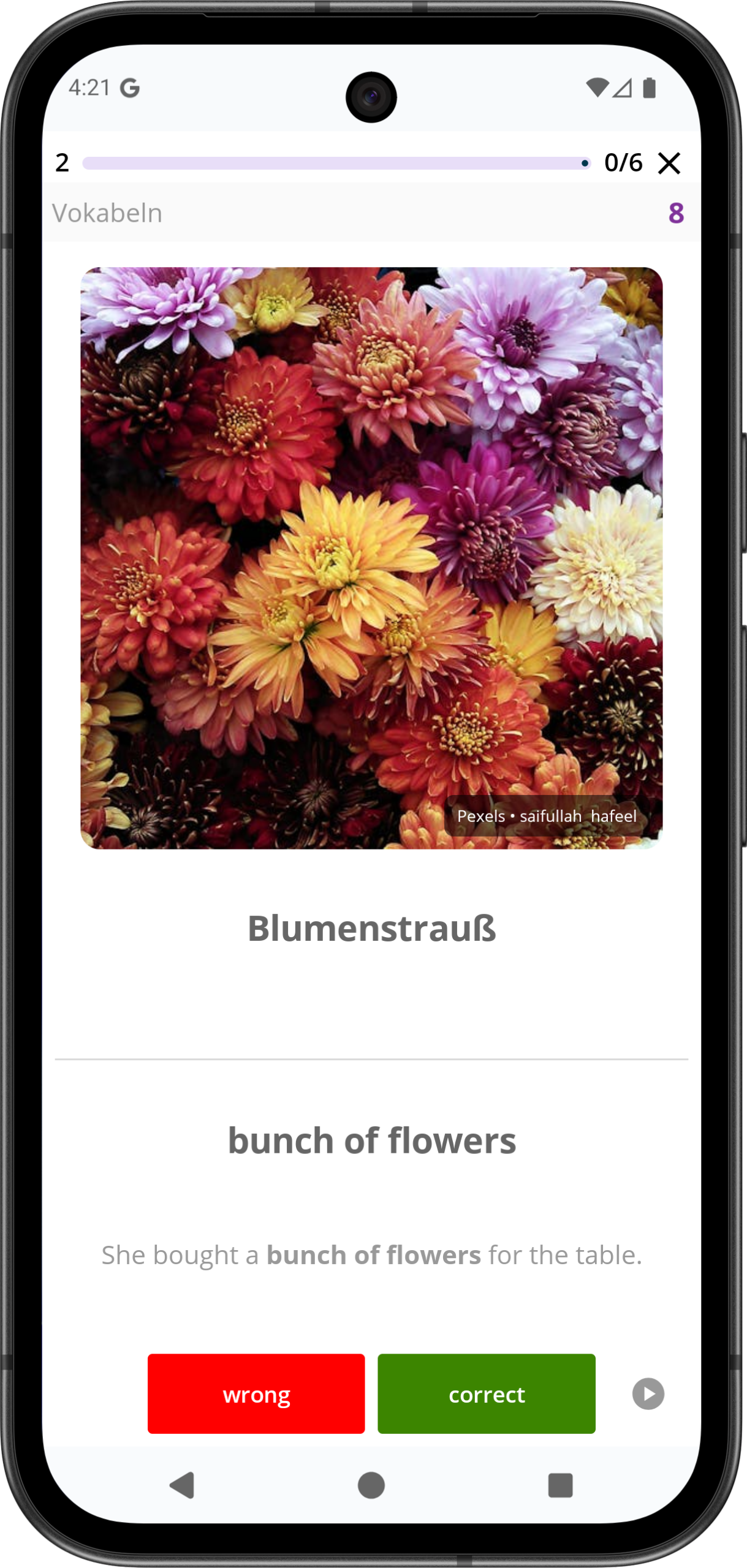
What dramatically increases learning efficiency is displaying an image alongside the word in addition to the audio. A visual anchor like this helps enormously. I added this feature quite late, but now I wouldn’t want to do without it. The Babbel vocabulary trainer has this, but Babbel is a learning platform rather than a classic vocabulary trainer.
I also experimented with using AI to generate suitable images, but that didn’t work well. So the solution now is that you select and set the images yourself. To make this nice and smooth, several free stock photo databases are integrated. I always add a source credit linking back to the original, of course.
It does take a little time to find and set the right images. But the effort is worth it, and I now do it for every single word.
Dictionary
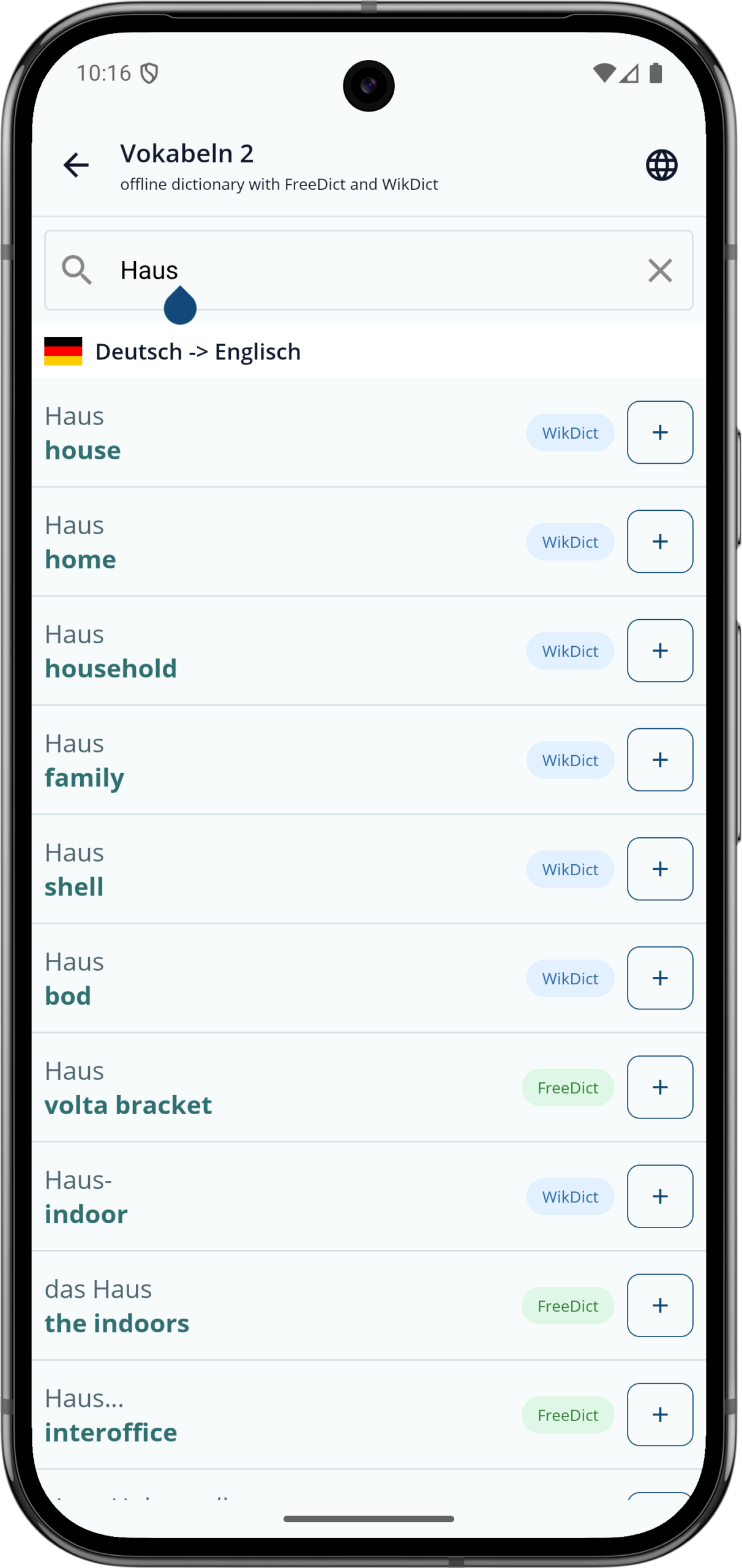
While I’m reading, I always have my smartphone within reach. For each vocabulary collection, there’s a button to open the dictionary. If I don’t know a word, I look it up right away. With one button, I can then immediately add the word to my learning list. This is very convenient because you don’t have to mark words separately and enter them later. Looking up, understanding, and adding to the trainer is simply one single step.
Originally I had connected a third-party service as the dictionary. The downside was that it was limited and not available offline. So I integrated two offline dictionaries directly into the app. This way, you can translate words and add them to your vocabulary collection at any time.
The dictionary is only available for German to English and vice versa.
Example Sentence and Score
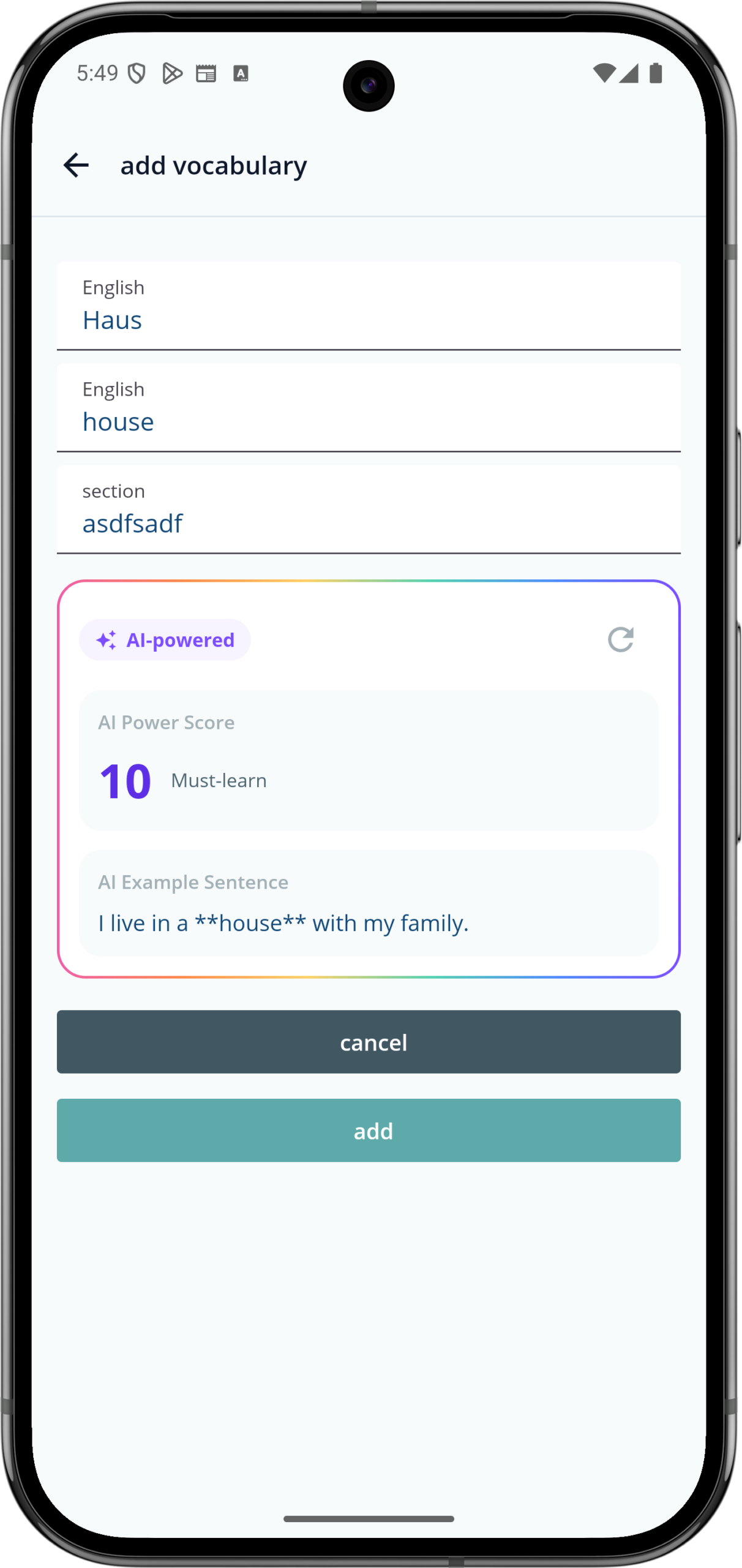
In English, I primarily read classics as well. But this has led to me learning words and expressions that nobody uses anymore. That happened to me when reading Robin Hood, for example. When I then spoke with native speakers, I often got strange looks. How was I supposed to know that you don’t say “Hey wench, bring me another beer” these days? Okay, I didn’t actually say that, but I really did stumble across the word “wench.” The question for me is whether it’s worth learning a word or not. Some are extremely rare and you’ll never need them again, while others are very useful.
To solve this problem, I calculate a score for each word — a value between 0 and 10, where 0 means useless, extremely rare, or archaic, and 10 means highly useful. This rating is handled behind the scenes by an AI language model. It gives you a good indication of whether a word is actually worth learning.
I also find it very helpful to have an example sentence for each word, to see how it sounds in context. This is very useful for reviewing and memorising. I generate these example sentences using Artificial Intelligence as well.
Search

It happens regularly that you forget a word again but can remember having learned it before. That’s why I’ve built a cross-collection vocabulary search. Tapping the magnifying glass at the top lets you search through all your vocabulary. You can also filter by phase and other criteria.
You can practice the current selection at any time (without affecting the phases — free practice, so to speak). For example, you can select all words in phases 1 and 2 and review them all in one go.
Story
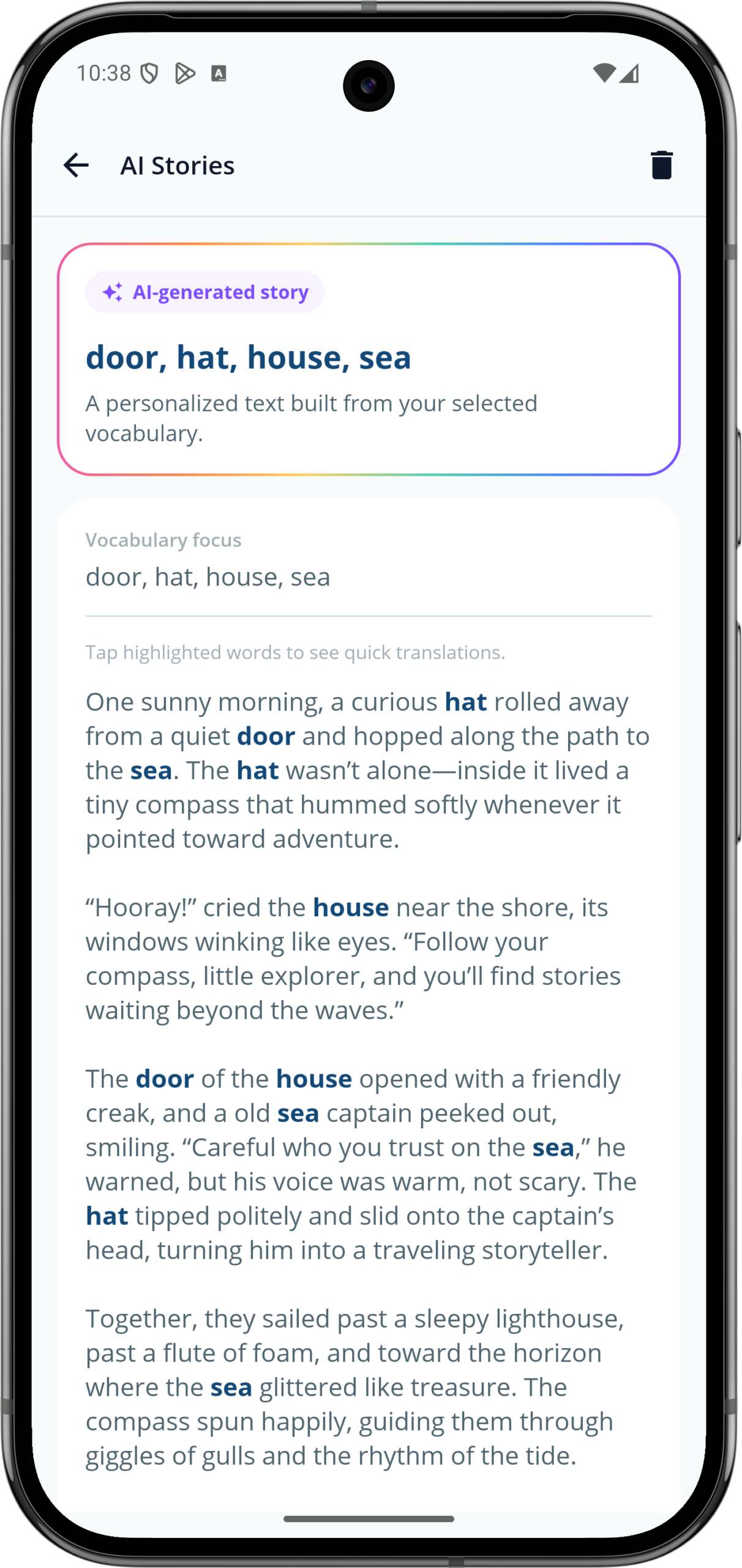
Some words are simply hard to learn, or only make real sense in context. I asked myself how you could still learn such words effectively. To address this, I implemented a Story feature. Using the search, you filter for words that are difficult to learn, and a short story is then generated from those words.
The stories are meant to be short, entertaining tales that weave the words into a meaningful text. You can tap on the words to see the translation again.
I find the feature quite fun, though I’ve actually used it only rarely. But the idea of having Artificial Intelligence generate a short story might be helpful and entertaining for some people.
Adding and Managing Vocabulary
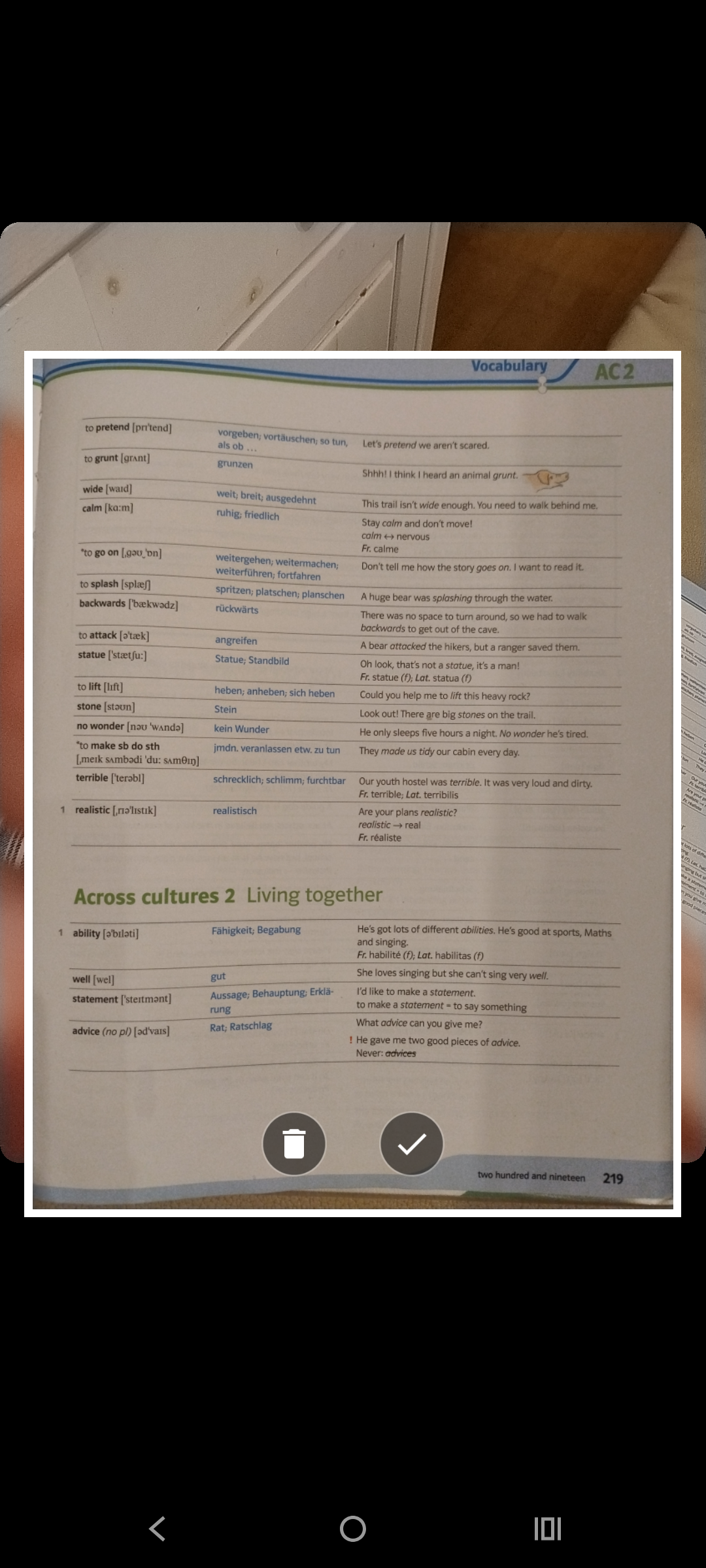
Especially when children need to learn vocabulary for school, you often have larger batches of words that need to be imported into the trainer. To avoid having to type everything out by hand, I’ve built in a feature that makes this much easier. You select a vocabulary collection, tap the photo icon at the top, and can simply take a photo of the textbook page with the vocabulary. An Artificial Intelligence then recognises the words and displays a list of the detected terms. This can be reviewed and edited, though that’s rarely necessary — in my experience it works very well. Individual words can also be removed from the list. With a tap on “add,” all the vocabulary is imported at once. In the background, an AI then generates a score and an example sentence for every word.
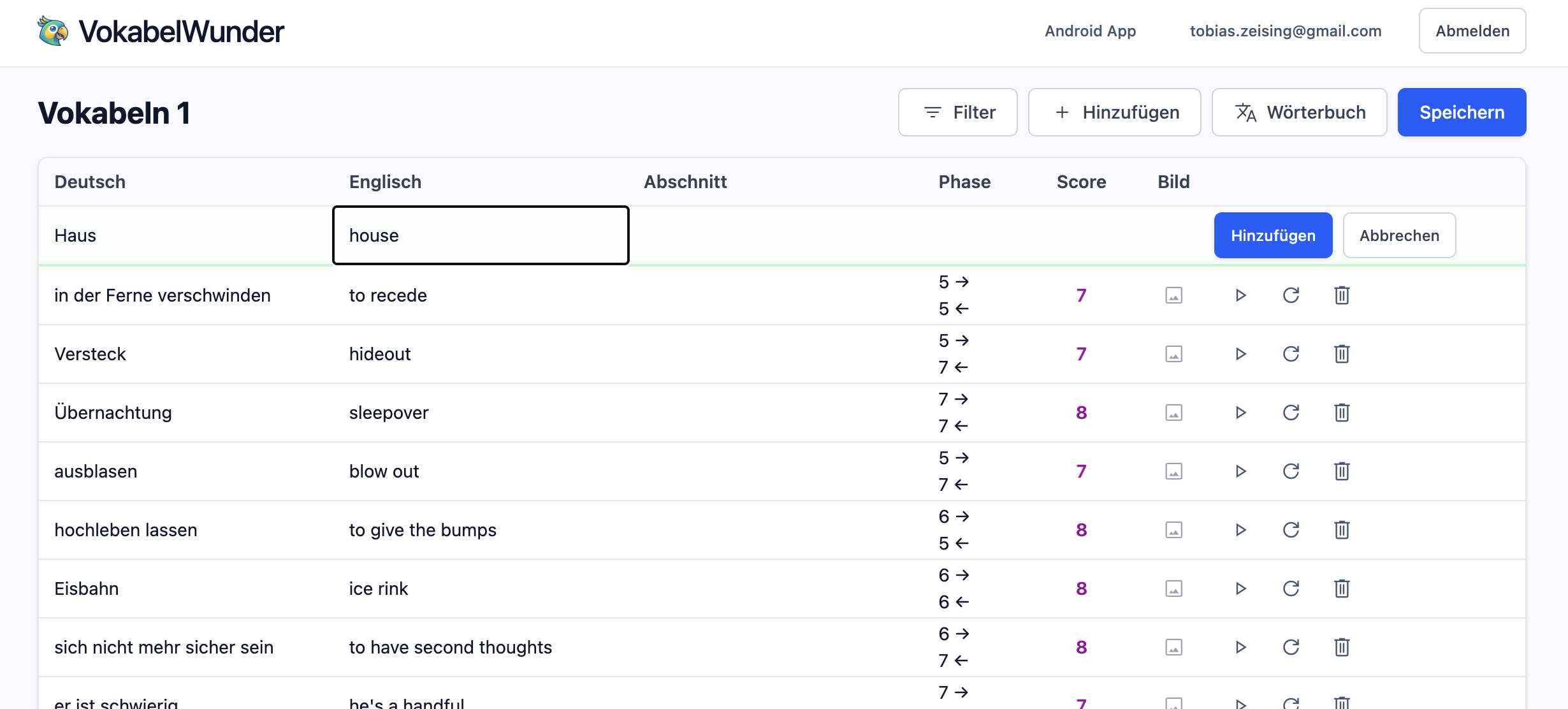
On the website, larger amounts of vocabulary can be typed in quite comfortably. That’s how I used to handle vocabulary from my children’s school textbooks. With other vocabulary trainers, the usability for this was always a nightmare. With VokabelWunder, you simply type the English word, then the German word, press Enter, and move on to the next one. Since I’m a fairly fast touch-typist, it doesn’t take long to transfer all the vocabulary from a textbook. Maybe not a killer feature, but it matters that vocabulary management flows smoothly.
Widget: Word of the Day
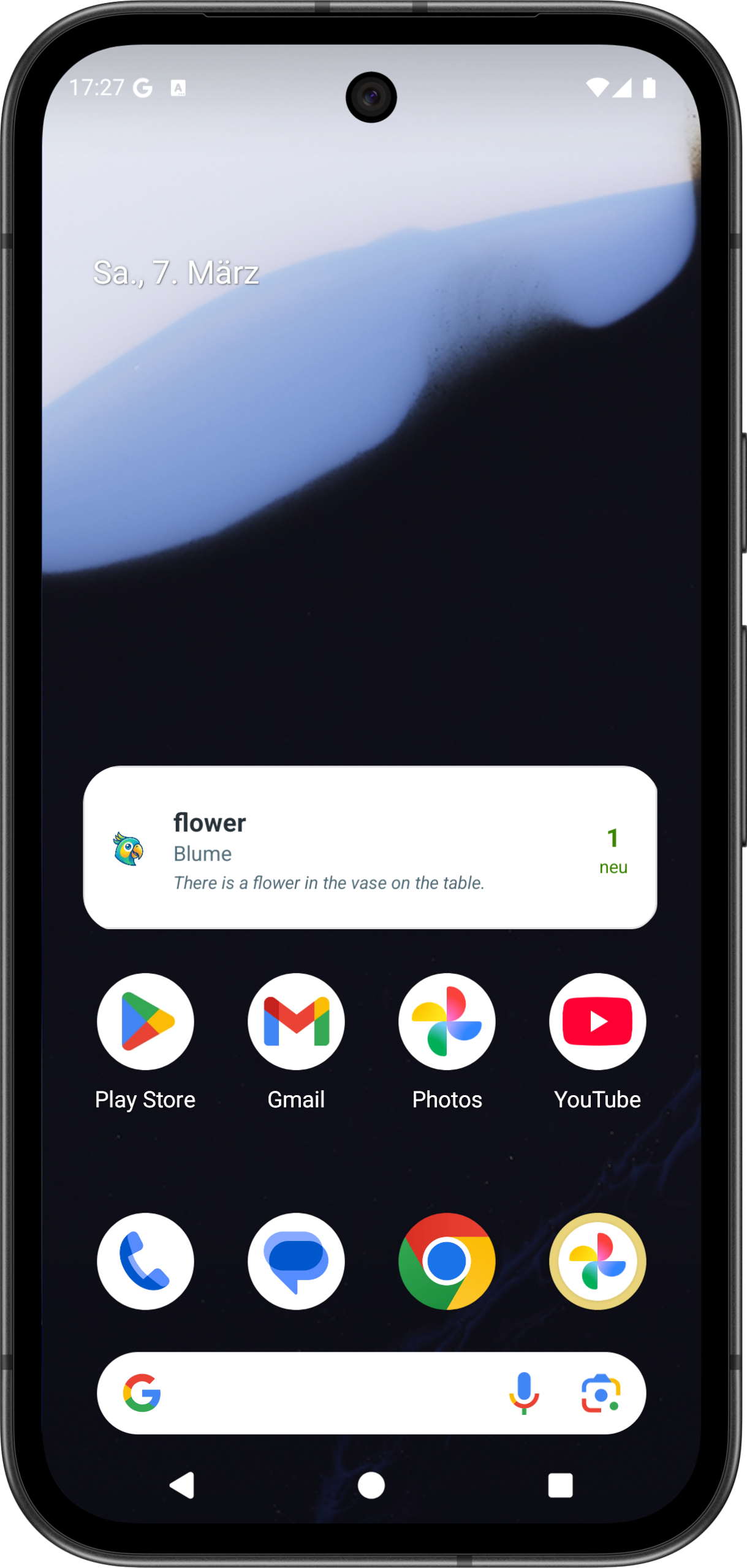
It’s very easy to forget to review your vocabulary. And the whole system only makes sense if you actually practice every day. After this happened to me a few times, I added a widget. It sits on my home screen and shows me whether I have vocabulary to review. When there are words due, the widget turns red.
The widget also displays the word of the day — most likely a word you don’t know very well yet, drawn from the lower phases. A tap on the widget opens the VokabelWunder app.
Privacy
Privacy has always been very important to me, and since the app is also intended for children, there should be no snooping around or selling of data. VokabelWunder keeps everything as data-minimal as possible:
- Login is handled via Google. Once successful, I only store the email address (and the Google user ID).
- You can delete your account and all your vocabulary at any time. Everything will then be removed from the database. There’s no going back after that, so think it over carefully.
- For the website I use Matomo. If you’d rather not, simply decline the cookie dialog. I don’t extract much information from it anyway — I’m really only interested in how many visitors I have.
- The site and backend are hosted at All-Inkl. They will have server logs of their own. Where I’ve had the option, I’ve disabled everything.
In short: I don’t snoop around, I don’t store anything for myself, no GPS, no tracking or anything like that. Just vocabulary and learning vocabulary.
Looking Ahead
I’m confident that VokabelWunder is a useful app for anyone who wants to learn a language — whether you simply enjoy reading books and want to expand your vocabulary along the way, or for children who regularly get quizzed at school and need to be well prepared. VokabelWunder is suitable for everyone. I use the app myself every day, and my children use it regularly too. VokabelWunder will therefore continue to be well looked after in the future. I’ll also keep thinking about which extensions and new features might make sense.
Building and deploying the app has taken a fair amount of time. Even so, the app is free for now. We’ll see how many people use it. I do have costs — particularly because of the AI features — but as long as everything stays within reasonable limits, I’d like to keep the app freely available. So that not just my children and I benefit from it, but as a gift to everyone who enjoys learning a language and wants to improve.
Feel free to send me feedback. Something isn’t working? Found a bug? Missing a feature? Please get in touch — here in the comments or by email. I’m always happy to hear from you.
Now go and visit www.vokabelwunder.de and start learning new words.
Alle Achtung, das klingt nach einer hervorragenden App, die ich direkt mal testen werde.
Allerdings bin ich als eingefleischter Anki-Nutzer immer etwas hin- und hergerissen, was neue Vokabeltrainer angeht, denn Anki ist da bekanntlich seit Jahren Goldstandard, was die Konfigurierbarkeit angeht. Anki ist ja für alle Lerninhalte geeignet.
Wunderbar wäre es natürlich, wenn man seine Vokabeln aus dem Vokabelwunder auch für Anki exportieren könnte (.txt., .csv), aber ich weiß, dass die meisten Apps das nicht zulassen. Andererseits macht es wenig Sinn, mit mehreren Vokabeltrainern zu lernen…
Jedenfalls bin ich sehr gespannt auf deine App!
Lieber Marcel,
Anki ist vom Umfang ja etwas weiter gefasst. Ich hatte es mal vor längerer Zeit angetestet, aber fand es von der Oberfläche schon echt speckig. Der Anwendungsfall Vokabeln zu lernen, ist schon nochmal etwas enger gefasst. Das Tool ist aber über Jahre sehr beliebt und man stolpert immer wieder darüber.
Einen Export könnte ich gerne mal bauen. Das ist ja nicht sehr aufwändig. Aber wie Du sagst, es macht nicht so viel Sinn mehrere Trainer parallel zu haben. Zumal man ja auch den Status immer mitführen müsste.
Ich hoffe VokabelWunder gefällt Dir. Wenn etwas fehlt, gerne mir Feedback geben. Das soll vom Funktionsumfang schon in Zukunft wachsen und gute und hilfreiche Ideen baue ich dann gerne mit ein.
Liebe Grüße
Tobi
Schönen guten Morgen!
Da hast du dir ja ganz schön viel Arbeit gemacht und die App klingt echt interessant! Ich lese ja seit einiger Zeit in englisch und übersetze mir das auf dem Kindle direkt (was dort ja möglich ist, bzw. kann man zumindest das englische Wörterbuch dazu holen) und bei Büchern schaue ich extern nach. Allerdings eher seltener, da ich sich die Wörter meist aus dem Kontext ergeben.
Ich glaube allerdings, dass ich tatsächlich zu faul wäre, immer alles einzutragen :D Das lernen kommt durch das lesen mehr oder weniger von selber, aber ich werde mir die App demnächst gerne mal anschauen :)
Deinen Beitrag hab ich heute in meiner Stöberrunde verlinkt.
Liebste Grüße, Aleshanee
Liebe Aleshanee,
ich lese nur selten auf dem Kindle. Dann ist das natürlich mit dem Wörterbuch da praktischer. Natürlich gebe ich immer schönen Ausgaben den Vorzug und dann habe ich beim Lesen mein Smartphone griffbereit. Da schlage ich das Wort dann nach und kann es mit einem Klick zur Vokabelsammlung hinzufügen. Dann entfällt also der zusätzliche Schritt das manuell irgendwie eingeben zu müssen.
Herzlichen Dank für die Erwähnung in Deiner Stöberrunde! Das freut mich wirklich sehr.
Liebe Grüße
Tobi
Viele gute Ideen, aber das Lernmodul erklärt sich mir nicht. Gehe ich in den Übungsmodus, bekomme ich eine Vokabel auf Deutsch angezeigt. Darunter sehe ich ein Tastatursymbol und ein Button “Antwort”, der auf meinem Handy nur zur Hälfte angezeigt wird. Erwarten würde ich die Möglichkeit direkt durch Spracheingabe die Vokabel zu trainieren. Clicke ich auf Antwort sehe ich die Vokabel auf Deutsch und die zugehörige Übersetzung und kann per Button auf “falsch” oder “richtig” clicken. Natürlich ist es immer richtig.
Entweder verstehe ich die Anwendung nicht oder es bleibt noch einiges zu tun.
Das Engagement finde ich aber super 🤩
Viele Grüße
Peter
Lieber Peter,
vielen Dank für Dein Feedback. Vom Prinzip ist das schon analog zu anderen Vokabel Apps. Also man trägt die Vokabeln ein und dann sind sie erstmal in der Vokabelliste und werden nicht automatisch abgefragt.
Wenn man dann mit “neu” beispielsweise 10 Vokabeln anfängt zu lernen, dann werden diese 10 Vokabeln in den Lernrhythmus aufgenommen. In einem ersten Schritt werden die 10 Vokabeln angezeigt und vorgelesen. Danach werden sie abgefragt. Erst von Deutsch -> Englisch, dann umgekehrt.
Dieses Abfragen bedeutet, dass das gesuchte Wort angezeigt wird. Im Kopf prüft man nun, ob man die Vokabel weiß. Oder man wechselt in den Eingabemodus und tippt die Lösung ein. Nun kann man einfach auf “Antwort” klicken und bekommt die Lösung angezeigt. Man muss selbst natürlich entscheiden, ob man die Vokabel wusste oder nicht. Je nachdem greift der Phasenmechanismus in die nächsthöhere oder niedrigere Phase. Abhängig davon wird die Vokabel dann nach einer bestimmten Zeit wieder abgefragt.
Wenn man die Liste einer Vokabelsammlung öffnet und dort auf üben klickt, dann wird auch ein Übungslauf gestartet, der zählt dann aber nicht für die Phasen. Damit kann man also gezielt nochmal üben oder nach einen Teil der Vokabeln filtern und üben.
Die App setzt also voraus, dass man sie vernünftig benutzt. Ein wenig motivierter Schüler könnte also natürlich immer “richtig” wählen, obwohl er die Vokabel nicht wusste. Das ist aber auch bei anderen Trainern oft der Fall. Der Wille die App vernünftig zu nutzen, muss also da sein. Natürlich kommt das auch ein bisschen davon, dass ich ursprünglich die App für mich, also Erwachsene entwickelt habe.
Ist der Antworten Button bei Dir abgeschnitten? Was für ein Smartphone kam denn zum Einsatz? Ich hatte es auch auf einem sehr kleinen Display getestet, da wurde der Button korrekt angezeigt. Vielleicht ist da noch ein Bug, der nur bei bestimmten Geräten auftritt.
Herzlichen Dank für das Interesse und für das Ausprobieren der App.
Liebe Grüße
Tobi
Vielen Dank für die Erläuterung. Das Prinzip habe ich jetzt verstanden und gleich ausprobiert. Und ich finde es ist großartig, vor allem durch die Fotoübernahme der Vokabeln. Eine Antwort per Spracheingabe wäre für die Zukunft noch eine schöne Ergänzung. Mein Handy ist ein Galaxy S21.
Viele Grüße und danke für die tolle App
Peter
Schön, leider aber ohne Koreanisch, daher für mich jetzt nicht nutzbar.
Der Anmeldeprozess war allerdings herrlich einfach, Lob dafür:)